
Reporting Statistical Results from SPSS in APA Format

When reporting SPSS results, researchers should clearly present both descriptive and inferential statistics. Descriptive statistics include measures such as the mean and standard deviation, which summarize the characteristics of the data. When reporting SPSS results in APA style, researchers should also interpret and explain the findings using clear and appropriate academic language.
This article contains an explanation of how to report statistical results from SPSS in APA format. This article also includes a discussion of the tools for reporting SPSS outcomes in APA style, such as MS Word tables, SPSS output editor, and result templates.
Understanding APA Style for Reporting SPSS Statistics
APA style for reporting SPSS statistics is a set of guidelines essential for presenting quantitative research results clearly in academic writing. Reporting SPSS output focuses on clarity by italicizing symbols such as (M, SD, t, p, and F) and rounding numbers to two or three decimal points, except p-values.
Reporting SPSS output requires clarity and adherence to APA style. Statistical symbols such as M, SD, t, F, and p should be italicized, and most numerical values should be rounded to two or three decimal places, except for p-values.
When researchers report SPSS results using APA style, the findings become clearer to readers and more comparable across different research disciplines. By presenting APA figures correctly, raw data is transformed into meaningful phrases to help the reader understand the study’s results.
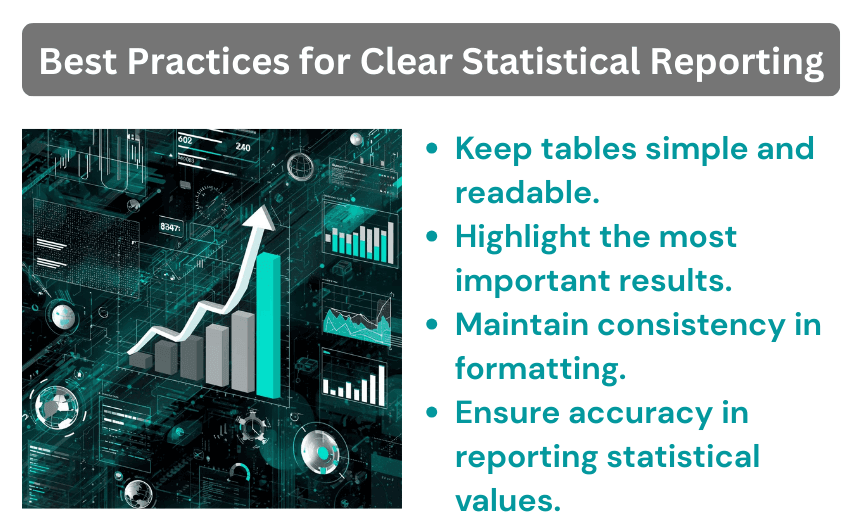
How to Report Statistical Results from SPSS in APA Format
Proper reporting of statistical results according to the APA 7th edition is essential for avoiding errors and ensuring clear communication of research findings. The format of reporting SPSS results entails;
1. Reporting Test Statistics
Test statistics in the APA 7TH edition entail italicizing symbols such as t, F, and p) and reporting the value to two or three decimal places, including degrees of freedom in parentheses. Key components of test statistics include degrees of freedom, test statistics, exact p-values, and effect size. Additionally, italicize the statistical symbols that aren’t Greek letters, such as t, F, p, M, and SD.
2. Reporting Means and Standard Deviations
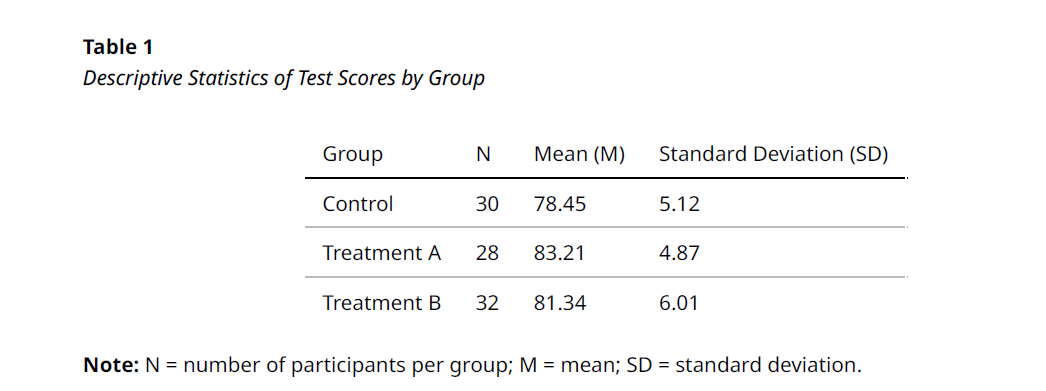
According to APA 7th edition guidelines, means (M) and standard deviations (SD) should be reported in parentheses using italicized statistical symbols, with values rounded to two decimal places and a space placed after the equals sign. When reporting results, researchers should include group sizes (n) and italicize statistical symbols. Numerical values should also be rounded to two decimal places. Means (M) and standard deviations (SD) may be presented within the text when describing statistical tests or summarized in a dedicated table for clearer presentation of the results.
3. Decimal Places
When reporting SPSS results in APA style, most statistical values should be rounded to two decimal places. This applies to descriptive statistics such as means (M), standard deviations (SD), proportions, and correlations. For descriptive statistics measured on integer scales, one decimal place may be sufficient if two are unnecessary. P-values, however, should generally be reported to three decimal places to maintain precision.
4. P-values
In APA format, exact p-values should be reported to two or three decimal places (e.g., p = .034) rather than using statements such as p < .05, except when p < .001. The symbol p should be italicized and written without a leading zero before the decimal. When reporting SPSS results, include the degrees of freedom, the test statistic, and the p-value. If SPSS outputs .000, the p-value should be reported as p = .001.
5. Italics
All statistical symbols that aren’t Greek letters must be italicized in APA style when reporting SPSS results. These symbols include t, F, p, M, SD, N, D, and r; however, Greek letters are used as symbols such as a (alpha), B (Beta), or n2 (eta squared). Additionally, if a subscript is a variable’s symbol, italicize it (M italic), and if it’s a descriptor, it should be italicized (Mtext).
6. Formatting Tables
To format SPSS results in APA, include a bold table number, italicized title, and, if it’s a requirement, write a note down below. Also, remove vertical lines, and instead use vertical horizontal lines that separate the column headings from the title, body from the table notes, and column headings from the body. In addition, to format the table, use a basic font such as Times New Roman, 1.5 or double space, and 12-point size.
Tools for Reporting SPSS Results in APA Style
Employing the right tools to present SPSS results in APA format enables researchers to convert complex statistical output into precise, readable, and professional writing, either for dissertations and other academic research. SPSS often generates detailed tables containing extraneous information; specialized tools and systematic approaches are essential for selecting the relevant metrics and formatting them in accordance with APA 7th edition guidelines. Tools for reporting SPSS results include:
1. MS Word Tables
Using Microsoft Word Tables in reporting SPSS results entails creating professional APA-style reports. Raw SPSS output tables are barely in the correct format and therefore contain unnecessary gridlines. By using MS Word tables, a researcher can form default fonts and remove excessive decimal points that do not comply with APA rules.
2. SPSS Output Editor
The SPSS Output Editor is an effective tool for formatting statistical results according to APA style, helping researchers save time when reporting findings. Using the Output Editor, researchers can select ‘APA Times New Roman, 12 pt’, remove unnecessary gridlines, and adjust fonts for clarity. Further customization is possible by double-clicking tables to modify borders, align text, and refine the presentation of results.
3. APA Formatting Checklists
Using an APA formatting checklist is essential for accurate reporting of SPSS output. Such checklists help researchers produce transparent and replicable results that comply with APA 7th edition guidelines. APA formatting checklists help bridge the gap between raw statistical output and polished academic reporting by guiding proper rounding, italicization, and inclusion of all required statistics.
4. Result Templates
By using result templates, researchers can report output in APA style in an accurate and clear approach in accordance with professional standards. Results templates are essential for translating complex and disorderly SPSS output into the required italicized, concise, and properly rounded APA style. Additionally, using the templates requires reporting the mean (M) and standard deviation (SD) for groups, followed by degrees of freedom, test statistic, and p-value.
5. Equation Editor (Word)
The equation editor in MS Word is a highly effective tool in reporting SPSS results in APA, accessed through ‘Insert > Equation’ or ‘Alt + =’. Equation editor is essential for proper formatting and italicizing mathematical symbols, Greek letters, and subscripts. Additionally, using the equation editor ensures that statistical symbols such as t, F, p, r, M, and SD are italicized, while Greek letters (e.g., α, β) and numeric values (e.g., n) remain in standard (roman) font.
Summary
Reporting SPSS results is not limited to copying numbers from output tables. Researchers must translate the statistical output into clear, well-organized, and academically sound narratives that effectively communicate the study’s findings. Understanding APA reporting is crucial for researchers as they prepare for academic writings such as dissertations and theses. Reporting SPSS results in APA enables students to understand what to report and how to communicate it.
In case you are a scholar looking for help to format statistical results from SPSS in APA, get in touch with our experts today. We are available 24/7 to respond to your inquiries promptly.